A B2B database is a collection of information about companies and their business contacts. It helps sales and marketing teams find firms that may fit their offer. Choose one by checking its market coverage, data quality and the contact details your team can use. A large record count is only a starting point. It does not show how many firms fit your market or how many have useful contact details. Begin with the campaign you want to run, then check whether the data can support it.
What Is a B2B Database?
A B2B database stores business details in a form that teams can search and review. These details may include company names, countries, industries, websites and contact information. The fields vary by provider and market. Teams use this data to find possible customers, research a market and plan outreach. The database helps you build a shortlist. Your team then checks which firms fit and how to approach them.
Providers use several terms for their data.
Database type | What it covers | What to review |
|---|---|---|
B2B company database | Focuses on the business itself. It may show where a firm operates, its industry and its status. | Check whether those fields give you enough detail to judge company fit. |
B2B contact database | Focuses on the people or contact routes linked to a company. | Check whether the provider lists a person’s name and role. Ask when it last checked those details. |
B2B email database | Focuses on business email addresses. Some records may point to a general inbox. Others may identify a named person. | Check which type you need and how the provider checks its addresses. |
The phrase B2B leads database can cover several of these categories. Inspect sample records to see what the term means in that product. A company profile does not always include a named buyer. A record is also different from a sales lead that has shown interest. A firm can match your search without needing your offer right now. Your team checks fit and interest through research, replies and sales conversations.
What Can a B2B Database Help Your Team Do?
A database can support several jobs, but each needs a clear brief. Decide what you want the data to help you learn or do before comparing tools.
Market research: You may want to find firms in a country and industry. Company details can help you explore the market and identify groups worth reviewing. A provider’s record total describes its own coverage, so check it before treating it as a count of the whole market.
Sales prospecting: You need firms that fit your offer and a way to approach them. The useful output is a reviewed shortlist. An email address adds value when your team can connect it to a relevant business and purpose.
Campaign planning: The data can help you split a broad market into focused groups. A supplier might prepare different messages for retailers and distributors. Each group should have a clear reason to care about the offer.
Existing accounts: Fresh data may help your team check company changes or fill gaps. Confirm how the provider matches new details to your records. Review conflicts before replacing information your team already holds.
What Information Should a B2B Database Include?
The right fields depend on the decision you need to make. A team choosing a market may need country and industry data. A sales rep preparing a conversation may also need a contact name and role.
Information | Why it matters and what to check |
|---|---|
Company identity | Names and business identifiers help your team tell similar firms apart. Where the provider supplies an identifier, check what it refers to and how your team can use it. |
Country, location and industry | Country and location fields help you check service coverage. Industry details help you decide whether the business fits the offer. Ask what each field means, since an office address and a registered address may serve different purposes. |
Operating status and website | Operating status can help you review whether a company suits the planned campaign. A business website gives your team another place to check its activities. Neither field alone tells you whether the firm needs your product. |
Contact names and roles | Contact names and roles help you judge who may handle the topic. |
Email addresses and phone numbers | An email address or phone number provides a possible contact route. Check whether the route suits a first introduction, a sales question or an existing relationship. |
Sources and update dates | Source details and update dates help explain the record. Ask whether a date refers to the whole profile or one field. Keep gaps visible so your team knows what still needs review. |
Other business details | Some providers also offer company size, revenue or other fields. Treat these as options to check, rather than facts every database supplies. Review their source and meaning if they affect your decision. |
More fields do not always make a record more useful. A few accurate details may support your next step better than a long profile with key gaps. Write down your essential fields before comparing providers.
How to Choose a B2B Database
1. Check Coverage in Your Actual Market
Start with the countries and industries you plan to target. A worldwide total says little about one small segment. Check the part of the database that your team expects to use. A provider may cover many firms across Southeast Asia. Its records for your chosen industry in one country may be much smaller. Ask to inspect that segment before judging the service.
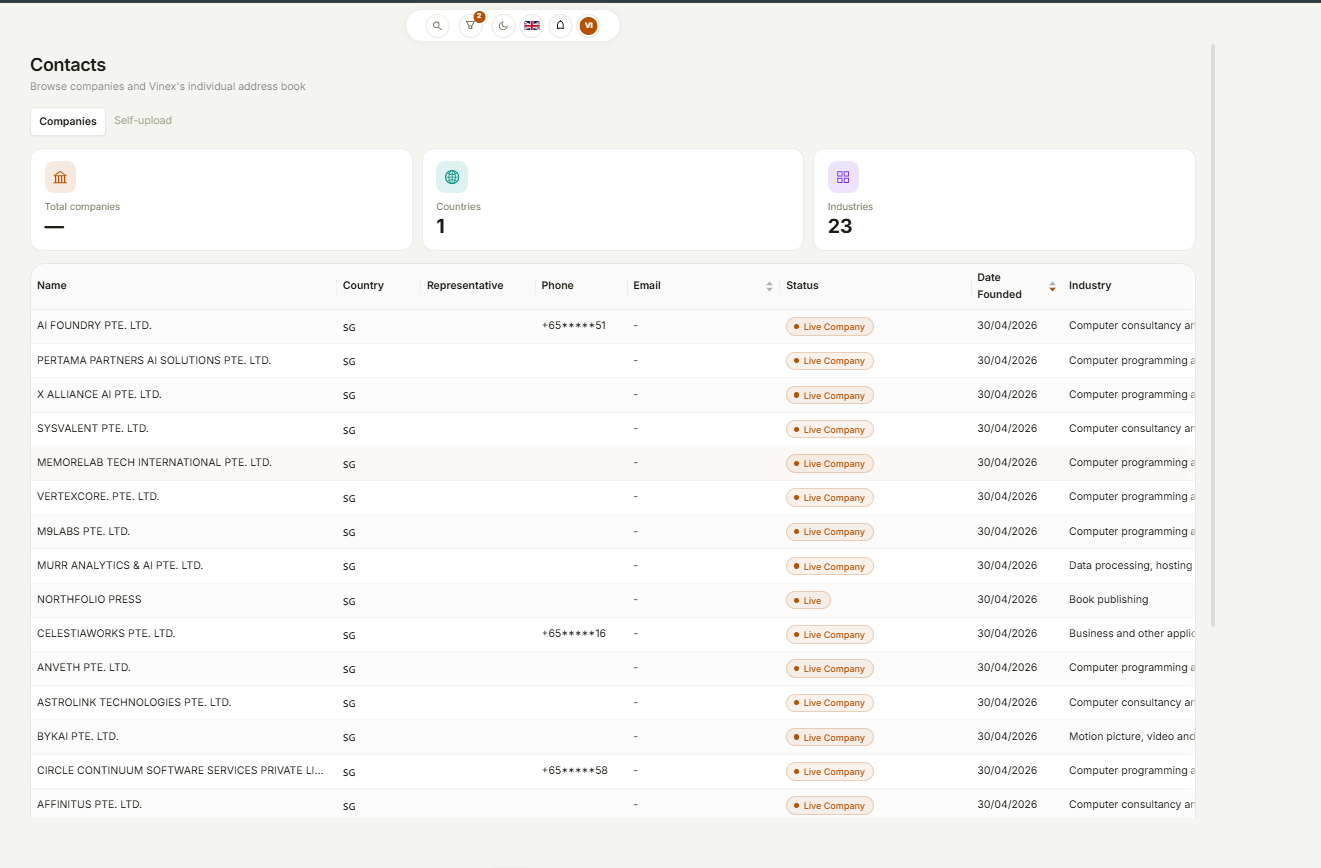
Clarify what the count includes. Some totals refer to companies. Others count people or email addresses. A search result may show matching records, while a campaign preview may show contacts available for sending. A list of matching firms can include companies with no usable email address. One firm may also have several contacts. Keep these counts separate when planning the audience. Check industry coverage as well as country coverage. Inspect the actual firms behind a broad category. Their business activities should fit your offer closely enough to justify further review.
2. Check Whether the Fields Support Your Sales Process
Define a suitable company before searching. Country and industry may be enough for a first shortlist. Some campaigns need a specific location, business activity or contact role. Then check whether the database supplies those fields often enough to help. A filter has limited value if many records lack the details behind it. Inspect sample results rather than judging the filter menu alone.
Read the field definitions. A broad industry category may include firms with different needs. Check their websites or other reliable details when the category leaves the fit unclear. Separate essential fields from useful extras. Missing an essential field may block the next step. Missing an extra field may simply mean that the team has less context. Choose fields that support a real decision. If a field does not affect targeting or outreach, it may not matter for the first campaign. This keeps the review focused on the work your team needs to do.
3. Understand the Sources and Update Process
Ask where the provider gets its information. Public business records, company websites and other sources may supply different parts of a profile. Review source details where the platform makes them available. Hunter, for example, describes two routes for email data. It collects some addresses from public sources. It infers others from a company’s email pattern and labels them as inferred. That example shows why it helps to ask how a provider obtained a contact. Check the source, the method and the level of certainty. Apply the provider’s own definitions when reviewing its results.
Ask how the team handles changes. A firm may change its website or office. An employee may move to another role. Find out how the provider checks for these events and corrects records. An update date may cover only part of a profile. Ask which fields the provider checked and when. Use that answer to decide what your team should review before a campaign.
4. Ask What “Verified” Actually Means
Verification can cover several checks. A tool may check the format of an email address and whether its domain has mail records. It may also try to check the mailbox with the receiving server. Hunter’s Email Verifier documentation explains these checks and its result labels. It also describes accept-all domains, where the mail server may accept addresses even when a specific mailbox does not exist. These results need a different review from a clear invalid result.
Ask which checks the provider runs. Confirm when it last ran them and what each status means. Find out how it handles results that it cannot confirm. Technical checks do not prove that the company fits your offer. They also do not prove buying interest, inbox placement or a likely reply. Review the contact route alongside the audience and message. Use verification as one part of the review. A team still needs accurate content, a suitable sender and a clear next step. Strong data supports that process without settling every decision.
5. Review How Data Fits into Your Workflow
Think through what happens after you find a firm. Your team may need to save a shortlist, inspect contacts, prepare email content or move records into another system. Check each step that matters to the campaign. Search access, contact access, campaign targeting and bulk export are separate features. Confirm the fields, formats and limits for the actions you need. A subscription may not include every possible use of the data.
If your team uses a CRM, check how new records will enter it. Confirm any import process or integration before relying on it. Decide how you will handle duplicate records and conflicts with existing details. Review the handover between team members too. The person who selects companies may not write or approve the email. Make sure the next person can see the target criteria and any gaps that need checking. A connected process can reduce repeated work. Its value depends on how easily the team can review and use the data at each step.
6. Compare Cost Against Usable Records
Check what the price includes. Providers may charge for access, contacts, exports, credits or other actions. Ask which actions use an allowance and what happens when it runs out. A low price per record can hide extra work. Your team may need to correct details, remove poor matches or research missing contacts. Include that time when comparing options.
Compare providers using the same target group and required fields. A low-cost sample from an easy segment may not reflect the work in your actual market. Keep the review conditions as similar as possible. Also check what happens after the first campaign. Your team may need fresh records, repeated checks or access to past work. Review the terms that affect those next steps. The useful question is how much it costs to produce a relevant, reviewed audience. Consider the total work needed to reach that point, as well as the access fee.
How Can You Test a B2B Database Before Committing?
Use a sample from the segment you plan to target. If you need logistics firms in Vietnam, test that group. A sample from another market may give a poor picture of the coverage you need. Write the target criteria before you inspect the sample. Include the country, business activity, essential fields and intended contact route. Use the same brief for each provider.
First, review company fit. Check whether each firm meets the criteria. Keep a short reason when you remove a record, such as wrong market, wrong activity or unclear identity. Next, review the fields needed for your next action. Note missing contacts, unclear roles and details that need further research. Do not fill a gap with a guess just to complete the list.
Check for duplicate firms and contacts. Similar names may need a closer look. Use the available business identifiers, websites and other details to decide whether records refer to the same firm. Track the work needed to prepare the sample. A list can contain relevant firms and still take too long to review. Record the time your team spends checking each stage.
For an illustrative example, consider a packaging supplier looking for cafés in Malaysia. One record lists a café with a working website and a general enquiries inbox. It may suit a first introduction, but it does not identify the buyer. Another record belongs to a food wholesaler. It may sit within a broad food category, yet fall outside this campaign’s café brief. The team should remove it from this sample or assess it for a separate campaign. A third record appears to repeat the first café under a shorter name. The team should review the match before treating both entries as separate prospects. These checks show why raw record totals can differ from a useful audience.
At the end of the trial, compare:
Company fit.
Key field coverage.
Usable contact routes.
Duplicates.
Review time.
Keep the date and criteria with the result. This makes it easier for another team member to assess your choice.
How to Turn B2B Data into a Useful Campaign
1. Define One Target Segment
Choose a group with a clear reason to care about your offer. Start with the country, industry and business need you can support. Keep the first audience focused enough to review. A group such as all businesses in Southeast Asia gives little direction for the message. A narrower brief helps you decide which firms belong in the campaign. It also helps the writer explain why the offer matters. Separate groups when they need different offers or next steps. A retailer and a distributor may both fit your business, but they may need different information.
2. Review the Companies and Available Contacts
Check company fit before you review the contact route. A valid address has little value for this campaign if the business falls outside your target group. A general inbox may need a different message from a named person’s address. Do not assume that a recipient handles buying decisions unless you have checked their role. Keep the purpose of the first email clear. Remove duplicate entries and apply the relevant recipient exclusions. Note any records that still need review. Give the person preparing the campaign a clear view of the final audience.
3. Connect the Offer to a Relevant Use Case
Use the data to explain why the offer may matter. Adding a company name is only a small part of making a message relevant. The offer should connect to a need the business could reasonably assess. In the café example, the supplier can introduce suitable packaging products and invite a catalogue request. The team should first confirm product details and service coverage. Avoid claims about the café’s current supplier, budget or order volume unless you have checked them. Use the information you know and make the next step easy to understand.
4. Prepare and Review the Email
Give the writer or AI assistant a brief with the audience, approved facts, offer and intended action. Include the language and tone when they matter. Review the subject line, message and call to action together. Check product claims, prices and delivery terms against the approved information. Test any links and review the sender details before sending. AI can help draft or revise the email. Your team still owns the offer and the choice to send it. Use the review to check facts as well as style.
5. Use Responses to Improve Your Working Records
Replies can add facts that the original data did not contain. A recipient may name the right contact, explain a need or say that the offer does not fit. Keep those findings with your working records or sales system. Record contact changes and clear next steps. Apply opt-outs and other relevant exclusions to future campaigns. Use the findings to refine the next audience. Repeated wrong-company replies may point to a weak filter or a broad category. Check the records before changing the message alone.
How Saella Connects Business Data with Email Campaigns
Saella combines business data, audience selection, AI assistance and email campaign tools. Its business data covers Vietnam, Singapore, Malaysia, Indonesia, the Philippines and Thailand. Users can define a target group with supported country and industry criteria. The next step is to review the matching firms and the contact information available for the campaign. Keep matching company records separate from the final sending audience. Available email addresses and recipient exclusions can change the number of contacts left. Review the campaign audience before approving delivery.
Saella’s AI can help prepare email content from business context and writing instructions. Users can review the proposed content and supported campaign actions before proceeding. The database and content tools support different parts of the same task. Teams can also use their own contacts. This supports campaigns based on an existing business contact book or customer list. Choose the source that fits the audience you want to reach. Begin with one country, one relevant industry and one approved offer. Check the audience and message, then review the results before expanding the campaign. This gives your team a defined starting point for learning what needs work.
How Should You Keep Your B2B Data Useful?
Assign an owner to the working list. That person should know where to record corrections and how the team handles conflicting details. A simple shared rule helps prevent people from repeating the same research. Keep dates with important findings. A reply from a contact can be useful evidence, but later events may change the situation. Record what you learned and when you learned it.
Separate facts from assumptions. A confirmed contact role is different from a role your team guessed. Keep uncertain details clear so the next person can review them. Use campaign results to ask focused questions. Bounces may prompt a contact check. Replies from the wrong firms may prompt a targeting check. Low response alone does not prove that the database is poor; the offer, content and delivery also affect results. Review source quality and campaign outcomes as separate parts of the process. This helps your team decide whether to improve the data, the audience brief or the outreach itself.
What Mistakes Should You Avoid When Choosing a B2B Database?
Choosing by size alone can hide gaps in the segment you need. Check your target market and industry before relying on a global total. Review each country you plan to use.
Treating every company as a contact can inflate the expected audience. Treating every contact as an interested buyer can inflate the sales forecast. Review company fit, contact access and buyer response as separate steps.
Reading verified as a guarantee can hide uncertainty. Ask which checks the provider performed and what it could not confirm. Check the result labels before using the data.
Ignoring preparation work can make a cheap list costly to use. Include research and review time in the comparison. Keep findings from replies so the next campaign benefits from the work.
B2B Database FAQs
Is a B2B Database the Same as a CRM?
They may hold some of the same details, but they support different jobs. A B2B database helps you find and assess firms. A CRM usually helps your team manage its contacts, conversations and sales work. Some platforms connect the two. Check how they move records and handle updates before relying on that process.
Does a Company Database Include Decision-Maker Contacts?
Not always. A company record may show business details and a general contact route. It may not name the person who handles your topic. Inspect the available fields and samples. If the campaign needs a specific role, check coverage for that role in your market.
Should a Small Team Build Its Own List or Use a Provider?
Consider the size of the audience and the time needed to research it. Direct research may suit a small, narrow group. A provider may help with a broader market if its coverage fits. Compare the work needed to produce a reviewed audience. Include access fees and staff time.
How Often Should You Review Your B2B Data?
Check essential details before using them in a campaign. Review them again when replies or other evidence show a change. The right timing depends on the fields and how your team uses them. Ask about the provider’s update process and keep your own findings current.
Can a B2B Database Support B2C Email Campaigns?
Business records help identify companies and professional contacts. A consumer campaign needs an audience that fits the consumer offer. For emails to existing customers or subscribers, use your own appropriate contact list. Saella supports working with your own contacts alongside its business data features.
Find a Relevant Audience Before Writing the First Email
Start with the market you serve, the firms you want to reach and the facts needed to assess them. Test a sample before judging a database by its size. Saella connects business data with AI-assisted email preparation and campaign tools. Choose a focused audience, review the available contacts and prepare a relevant message. Explore Saella’s business data and email campaign tools.
Find your next customers in Southeast Asia
Start free