A welcome email is the first message you send to a new subscriber or customer. Send it right after they sign up. It should thank them, say what to expect and give them one clear next step.
This guide explains why the welcome email matters, when to send it and how to write each part. You will get five copy-ready templates, ten subject lines, a three-email welcome series and a list of common mistakes. We invented all sample text, so replace the details with your own.
What is a welcome email and why does it matter?
A welcome email is an automated message that goes out when someone joins your list, creates an account or makes a first purchase. It is often the first email a person reads from you, so it sets the tone for the rest.
A good welcome email lets you:
1. Make a first impression you chose.
A new subscriber knows almost nothing about you yet. In a few short lines, the welcome email shows who you are and how you sound. The reader meets you before any offer arrives, so the first impression comes from you, not from whichever email happens to go out next.
2. Build trust from the first message.
A welcome email confirms the sign-up and shows readers they are in the right place. Say how you will use their address. Make the unsubscribe link easy to find.
3. Set expectations for every email that follows.
Tell readers what you will send and how often. For example: "One email a week with brewing tips." They now know what to expect. Your team has a clear schedule to follow.
4. Help your later emails reach the inbox.
When readers recognize your name and open your first email, mailbox providers see a sign of a wanted sender. A one-line request such as "Add us to your contacts so our emails reach you" costs nothing to write and can also help.
"Deliverability" describes whether emails reach readers and where they land: inbox, spam or nowhere. A welcome email helps a new subscriber recognize your sender name.
Send the content you promised, make it easy to unsubscribe and watch for delivery problems. One opened email does not guarantee that later messages will reach the inbox.
When to send a welcome email
Send the welcome email within minutes of the sign-up, and send it automatically. At that moment the reader is thinking about you. If you wait a day, they may forget why they signed up.
Set it up as an automated email that starts when someone joins your list. Our guide to email automation explains how triggers and workflows work.
Welcome email vs. onboarding email
People often mix up these two types. A welcome email is the first message, and it usually stands alone or opens a short series. An onboarding email belongs to a longer sequence that helps new customers learn to use a product.
How to write a welcome email: 7 parts to include
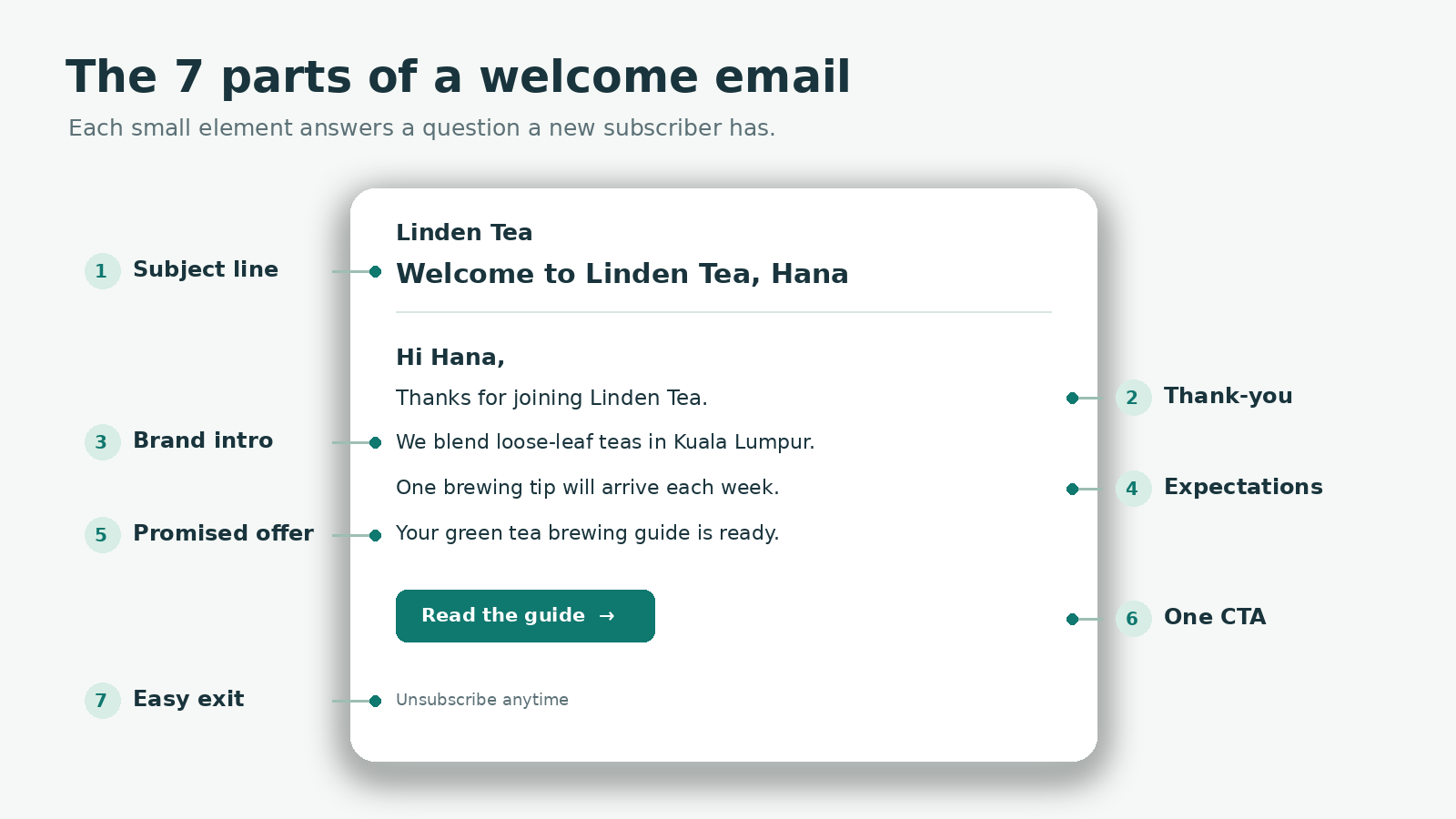
Each part below is small, but each one quietly does more than it seems. The examples use an invented tea shop, Linden Tea, and an invented reader, Hana.
Subject line. Make it clear and warm, and keep it short. A line such as "Welcome to Linden Tea, Hana" tells the reader who is writing and why, before they even open the email.
Thank-you. Start with a simple line such as "Thanks for joining the Linden Tea list." It confirms that the sign-up worked and identifies the sender.
It also starts with the reader's action. You can explain your offer after making clear why this message arrived.
Brand introduction. Say who you are in a sentence or two. For example: "We are a small tea shop in Kuala Lumpur that blends loose-leaf teas." The reader can connect the sender name to a real business.
Expectations. Say what you will send and how often: "You will get one email a week with brewing tips and new blends." Readers can decide whether that suits them. Your team has a clear promise to keep.
Promised offer. Deliver what you promised at sign-up, such as: "Here is your brewing guide." Keeping that first promise right away is the fastest proof that you will keep the others.
Call to action (CTA). Name one next step, such as "Browse our starter blends." One button removes a decision: the reader does not weigh options, they simply take the step or not. It also keeps your results easy to read, because if clicks are low you know exactly which step to rework.
Unsubscribe link. Make it easy to leave: "Not what you expected? Unsubscribe here." A clear exit gives people a simple choice when the emails no longer fit.
It also keeps your list focused on readers who still want to hear from you. Test that the link works.
Keep the email short. Most readers scan it on a phone. Put the main point and the CTA near the top, and use short paragraphs.
Welcome email best practices
Use a real sender name and a reply-to address that works. A reader who replies should get an answer. This small setting turns a broadcast into a conversation. Replies tell you in the reader's own words what they want, and a reader whose reply gets an answer learns that a person stands behind the brand.
Match the email to the promise. If the sign-up form offered a guide, deliver it first.
Use a first name only when the data is reliable. A missing field can turn "Hi Hana" into "Hi ,". Use a natural generic greeting when the name is blank, and test both versions before sending.
Keep one main CTA. A second link is fine if it is clearly secondary, such as a link to your social profiles.
Design for phones. Use a single column, short text and a button big enough to tap.
Include your business name and contact details so readers know who is writing.
Send a test to yourself and check every link before you launch.
How to personalize a welcome email
Personalization goes beyond the first name. The most useful signal is how the person joined, because that source tells you what they expect from you. A reader who downloaded a guide wants the guide. A reader who bought a product wants help to use it. A reader who joined a newsletter wants to know what the first issue covers.
Think of a shop assistant who notices which door you came in by. Someone who came through the returns door gets a different greeting from someone who came through the front. In one line: the form a person filled in tells you what they came for, so let it choose the email.
Use the information you already collect at sign-up, and avoid asking for more in the first email. Tailor three elements: the promised offer, the main CTA and the tone. When your list has several sign-up sources, write one version of the welcome email for each source and send each version automatically. Here is how the focus changes by source.
Newsletter form. The reader expects regular, useful content. Tell them how often you write, give a sample topic and point them to your best article.
Resource download. The reader expects the file they asked for. Put the download link first, then add one related tip.
First purchase. The reader wants help to use what they bought. Thank them, set out the next steps and show where to get help.
Free trial or account. The reader wants a quick start. Name the first action and link to the help page.
Event registration. The reader wants details and reminders. Give the date and place, and say what to prepare.
Keep personalization honest. Refer only to information the reader gave you, and never mention browsing behavior they would not expect you to track. A warm, clear general email still beats a clumsy personalized one.
5 welcome email templates
Copy these templates and replace the brackets. Use only the claims you can support. Each template includes a subject line.
Template 1: Friendly introduction
Subject line: Welcome to [Brand], [First name]
Hi [First name],
Thanks for joining [Brand]. We are [one-sentence description].
Once a week, we send you [what you will send]. To get started, read [useful link or tip].
Questions? Just reply to this email.
[CTA button: Start here]
Template 2: Welcome discount
Subject line: Your welcome gift from [Brand] is inside
Hi [First name],
Welcome to [Brand]. Here is [offer] on your first order.
Use code [CODE] at checkout by [real expiry date]. Not sure where to start? Our most popular items are below.
[CTA button: Shop now]
Offer a discount only if you plan to honor it. State the real end date, and keep the terms short.
Template 3: Onboarding welcome
Subject line: Your first step with [Product]
Hi [First name],
Your [Product] account is ready. The fastest way to get value is to [first action]. It takes about [time].
This short guide walks you through it.
[CTA button: Take the first step]
Template 4: Resource delivery
Subject line: Here is your [resource name]
Hi [First name],
Here is the [resource name] you asked for: [Download link].
Inside, you will find [one-sentence summary]. Over the next few weeks, we will send a few short emails with related tips. You can unsubscribe at any time.
[CTA button: Download now]
Template 5: Brand story
Subject line: Why we started [Brand]
Hi [First name],
Thanks for joining us. We started [Brand] because [short, true reason]. Since then, [one factual sentence about what you do].
We would like to hear your story, too. What brought you here? Reply and tell us.
[CTA button: Read our story]
The closing question in Template 5 is doing more than being friendly. It invites the reader to answer in their own words, which tells you why people join. It also turns a one-way message into the start of a conversation, so the reader sees you as people, not as a mailing system.
10 welcome email subject lines
Good subject lines are clear, short and honest. Try one of these, and test it against another.
Welcome to [Brand], [First name]
You're in. Here's what happens next
Thanks for joining [Brand]
Your [resource name] is ready
A quick hello from [Brand]
Start here: your first step with [Product]
Welcome! A few things to know
Here's your welcome gift, [First name]
What to expect from [Brand]
Say hello to [Brand]
Skip all-capital words, extra punctuation and promises you cannot keep. They can trigger spam filters and reduce trust.
Subject line and preview text tips
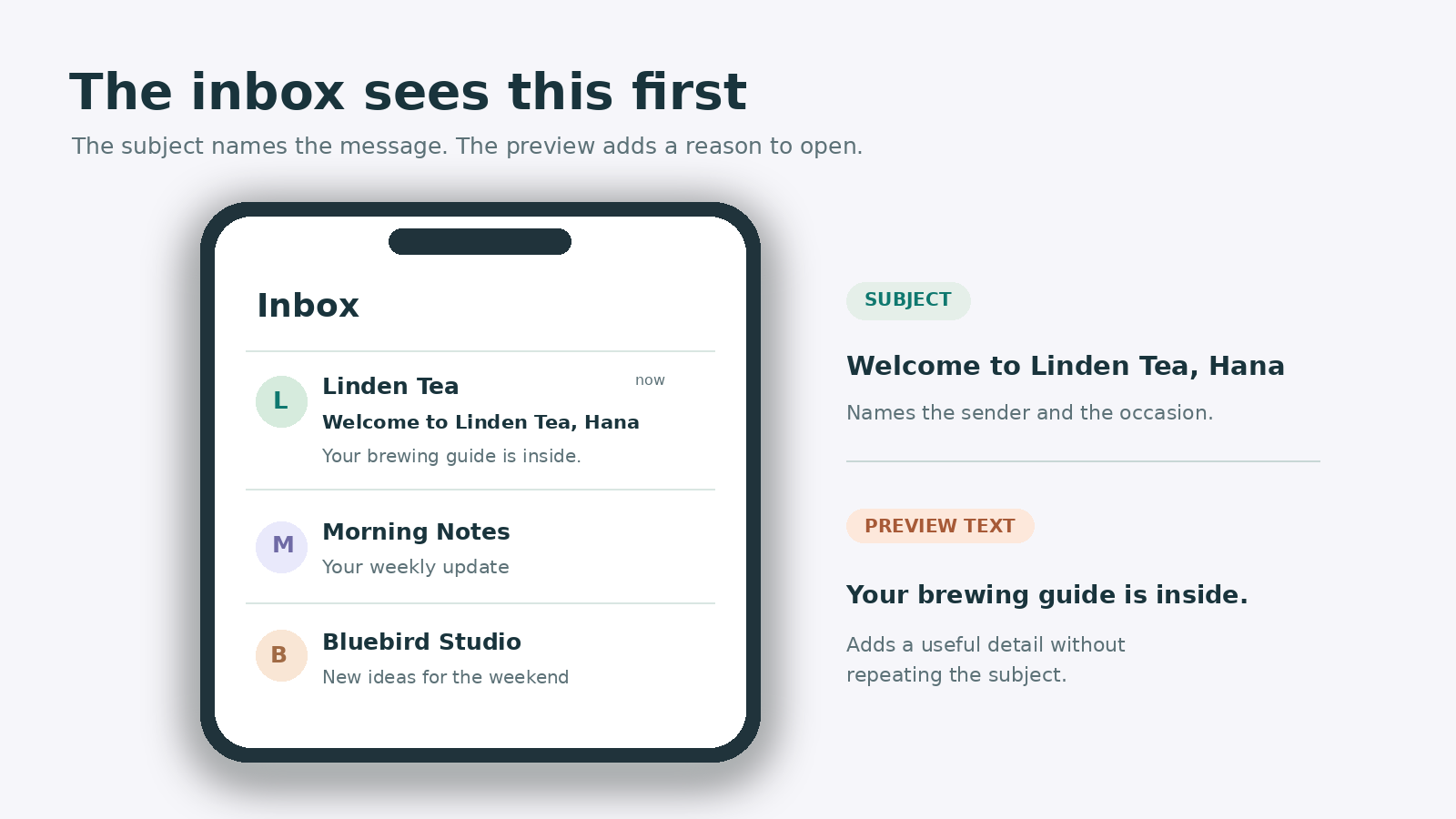
The inbox shows your subject line and your preview text side by side, so write them as a pair. The subject line names the topic. The preview text, also called the preheader, adds one detail that earns the open.
The preheader is the short line some inboxes show beside or below the subject. It can add a detail the subject did not have.
If you leave it blank, the email app may pull in the first words of the message. Write and test your own line so it helps readers decide whether to open.
Put the key words first. Phones cut long subject lines.
Name your brand or the promised offer, so the reader recognizes the sender at once.
Use the preview text to add a new detail instead of repeating the subject line.
Avoid clickbait. A subject line that overpromises raises unsubscribes and spam complaints.
Test two options on similar audiences, and judge them by clicks, not only by opens.
These three subject and preview pairs for Linden Tea are invented.
"Welcome to Linden Tea, Hana" pairs with "Your brewing guide is inside, plus what to expect each week." The preview adds the offer and schedule.
"Your brewing guide is ready" pairs with "Three steps to a smoother cup." The preview tells readers what the guide covers.
"What to expect from Linden Tea" pairs with "One short email a week, and you can leave at any time." The preview answers the subject's question.
A filled-in welcome email sample
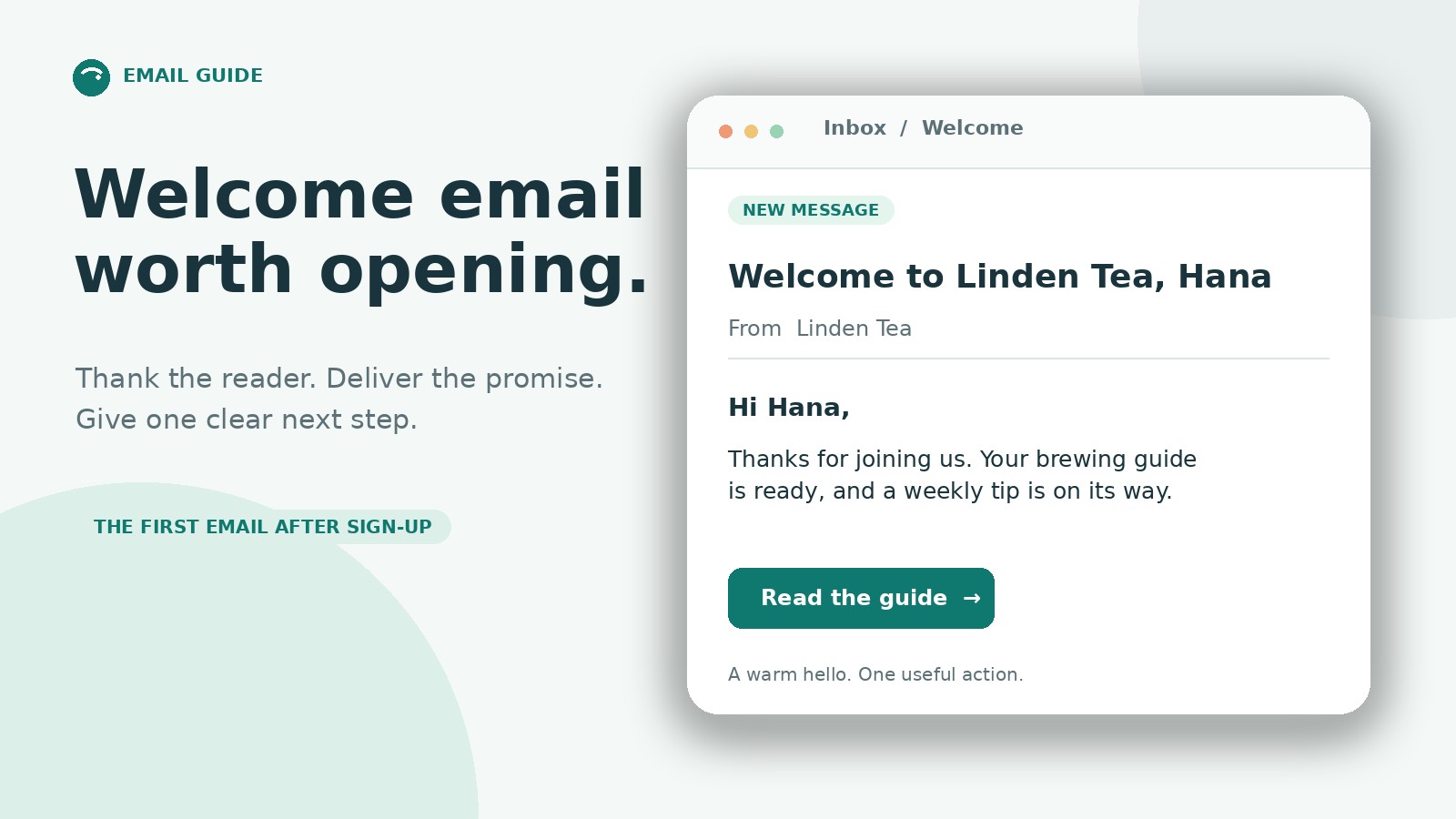
Here is Template 1 filled in for an invented business. It shows how short a good welcome email can be.
Subject line: Welcome to Linden Tea, Hana
Hi Hana,
Thanks for joining Linden Tea. We are a small shop in Kuala Lumpur that blends loose-leaf teas.
Once a week, we send you one brewing tip and news of any new blend. To start, read our guide to brewing green tea without bitterness.
If you have a question, reply to this email and a person will answer.
[Read the guide]
The email thanks the reader, says who writes, states how often to expect mail, gives a useful link and invites a reply. It has one CTA and no sales pressure.
Welcome email examples by business type
The same structure adapts to different situations. These four examples are invented. Study the structure, and do not copy the wording.
Software trial
Subject line: Your Quotely trial is ready
Hi Linh,
Your Quotely trial is ready. The fastest start is to build one quote from your own price list. It takes about five minutes.
Here is a short guide with screenshots.
[Build your first quote]
The email names one first action and gives a realistic time estimate. It puts no pressure on the reader to upgrade.
Online course
Subject line: Welcome to Basic Bookkeeping, lesson one is open
Hi Mai,
Welcome to Basic Bookkeeping. Lesson one takes 12 minutes and covers how to sort receipts.
We open a new lesson every Monday. You can learn at your own pace, and every lesson stays available.
[Start lesson one]
The email tells the learner where to begin and how the course will unfold.
Nonprofit newsletter
Subject line: Welcome to Green Streets, here is what we do
Hi Hana,
Thank you for joining Green Streets. We are a volunteer group that plants trees along city streets.
Once a month, we send one update with planting dates and ways to help. Our next planting day is on [real date].
[See how to help]
The email explains the mission in one sentence and offers a concrete way to take part.
Local bakery club
Subject line: Welcome to the Sunrise Bakery club
Hi Lan,
Welcome to the Sunrise Bakery club. Once a week, we share the bread of the week and early order slots.
Your welcome gift is a free coffee with your next loaf. Show this email at the counter by [real date].
[See this week's bread]
The email promises a small gift and states a real deadline for using it.
Welcome email examples to learn from
Compare real welcome emails from brands you subscribed to. Note which action each email asks for, what it promises in the subject line and how it introduces the sender. Keep the brand and capture date with each example. The categories below give you a consistent way to assess them.
Find a short, friendly introduction, and point out how the first line thanks the reader.
Find a discount welcome email, and point out how the offer and the end date are stated.
Find a welcome email that delivers a resource, and point out how the download comes first.
Find a welcome email that sets a sending schedule, and point out how it tells the reader what to expect.
Find a product welcome email with one first action, and point out how it names a single next step.
Find a brand-story welcome email, and point out how it tells the story in a few lines.
Find a welcome email that asks a question, and point out how it invites a reply.
Take notes on each example. Write down the subject line, the first sentence, the CTA and one thing you would change.
A three-email welcome series
One email is a good start. A short series often works better, because new subscribers are interested and ready to learn more. Here is a three-email plan with timing.
Email 1, the welcome, goes out right after sign-up. It thanks the reader, sets expectations and delivers the promised offer. Its CTA is "Get your offer."
Email 2, helpful content, follows two to three days later. It shares one tip or guide that fits the reader's interest, with the CTA "Read the guide."
Email 3, the invitation, arrives five to seven days after sign-up. It introduces a product, a service or a way to reply and talk, and its CTA is "See how it works."
Adjust the timing to your audience. Add an exit rule so that a reader who buys or books a call leaves the series. The series format works the same as a drip campaign. Our drip campaign guide explains the format in more detail.
How to automate your welcome email
Set the welcome email to send after sign-up or confirmation. The tool will then send it when each person reaches that step, even outside office hours. Follow these five steps to set up the rule.
Choose the trigger. The trigger is the "when": the event that starts the flow. Start it when someone joins a list, creates an account or completes a first purchase. Create a separate trigger for each sign-up source.
Map the data fields. Data fields are the blanks the email fills in for each reader. List the fields the email uses, such as first name and sign-up source. Decide what the email shows when a field is empty.
Set the delay. Most teams send the welcome email soon after sign-up. If you use double opt-in, send it after the reader confirms their address. Double opt-in means they sign up, then click a confirmation link.
Add exit rules. An exit rule is a stop sign. A subscriber who buys or books a call should leave the series, so they never receive an offer for something they already have.
Test with real addresses. Subscribe with two or three test addresses and check the arrival time. Open each email on a phone and on a desktop. Confirm that the links, images and unsubscribe link work.
The takeaway: a trigger, some blanks, a wait and a stop sign. That is the whole machine.
Our email automation guide explains triggers, conditions and waits in more detail.
How to measure whether your welcome email works
Decide before you send which result matters most. For a welcome email, the main signal is whether the reader takes the first step you proposed.
Click rate on the main CTA shows whether the next step interests the reader. For most welcome emails, this is the primary signal to watch.
Reply rate shows whether readers start a conversation. It is most useful when the email asks a question.
First action after the email shows whether readers download, buy or start. To read it, compare these readers with readers who joined before you sent the email.
Unsubscribe rate shows whether the email matched the sign-up promise. A high rate suggests a gap between what you promised and what you sent.
Spam complaints show whether readers see the email as unwanted. Investigate any rise at once.
Open rate shows whether readers saw the subject line, but treat it with caution. Some mail apps load emails automatically in the background, before any person reads them, and each of those loads can count as an open. So an open is a rough hint, not proof that someone read your email.
Compare results with your own earlier welcome emails rather than with general industry figures, because audiences and sign-up sources differ. Change one element at a time, such as the subject line or the CTA wording, so you can see which change moved the result.
Welcome email checklist
Run through this list before you launch the email.
The subject line is clear, short and matches the sign-up promise.
The first line thanks the reader.
The email says what you will send and how often.
The promised offer or resource is easy to find.
There is one main CTA, and the link works.
The unsubscribe link works and your contact details appear.
The email reads well on a phone, and the first name has a fallback.
Common welcome email mistakes
Being too promotional. A first email full of offers feels pushy. Lead with thanks and value.
Not setting expectations. Readers should know what you will send and how often.
Skipping mobile checks. A hard-to-read email loses readers in seconds.
Using no personalization, or bad personalization. A missing first name that shows up as "Hi ," looks careless. Test with blank data.
Sending too late. Send within minutes, while the reader still remembers signing up.
Hiding the unsubscribe link. It can hurt trust and may break the rules in your country.
Asking for too much. One next step is enough.
Set up your welcome email with Saella
Saella can help draft a welcome email from your campaign details and the group you select. Check the offer and dates before sending. You can try Saella with a business email address. For the flow itself, use the five setup steps above.
Welcome email FAQ
What should a welcome email include? A welcome email should include a clear subject line, a thank-you and a short introduction to your brand. It should also state what the reader can expect, deliver the offer or resource you promised, and end with one CTA and an unsubscribe link.
When should I send a welcome email? Send it within minutes of the sign-up, using an automated trigger. A quick email reaches the reader while they still remember joining.
How long should a welcome email be? Keep it short enough to read on a phone in under a minute. State the key points near the top and use short paragraphs.
Should a welcome email include a discount? Only if you plan to offer one. A discount can encourage a first purchase, but it can also attract readers who only want the code. If you include one, state the real end date.
Is a welcome email the same as an onboarding email? No. A welcome email is the first message after sign-up. An onboarding email belongs to a longer sequence that helps a new customer learn to use a product.
How many welcome emails should I send? One is enough to start. A series of three emails over about a week gives you more room to share useful content. Add an email only when it has a clear purpose.
What is the best subject line for a welcome email? No single line wins everywhere. A clear line that names your brand or the promised offer usually performs well. Test two options on similar audiences, and judge them by clicks and replies.
What is a preheader in a welcome email? The preheader is the short preview text that appears next to the subject line in the inbox. Use it to add a detail that the subject line leaves out, such as what the reader will find inside.
Can I send a welcome email to someone who did not sign up? No. Send welcome emails only to people who opted in. An email to someone who never asked to hear from you is a cold email, and different rules apply, so check the laws that cover your readers. If you send with Saella, also read the Saella anti-spam policy.
What is double opt-in, and does it replace the welcome email? Double opt-in asks new subscribers to confirm their address by clicking a link. The confirmation message is separate from the welcome email: think of it as a receipt, not a greeting. Send the welcome email after the reader confirms.
Should I send a welcome email from a no-reply address? Avoid it. A real sender name with a working reply address builds trust and invites replies, which also helps readers recognize you in the inbox.
Find your next customers in Southeast Asia
Start free